
Emaratax corporate tax registration is the first compliance step every UAE taxable person must complete, yet most delays happen inside the portal itself rather than in understanding the underlying law. This guide walks through the registration screens in order, so a first time filer knows exactly what to prepare before logging in and can avoid the resubmission cycle that catches so many first time applicants. It also flags the small details, a mismatched name, an unclear financial year choice, an incomplete signatory file, that turn a same week approval into a month long back and forth with the FTA.
Key Takeaways
- Registration starts with an EmaraTax account, which can be a brand new signup or an existing account already used for VAT.
- The registration form asks for trade license, ownership and financial year details that must match official documents exactly, since mismatches are the leading cause of resubmission.
- A Tax Registration Number is usually issued within days of a complete submission, and it starts the clock on the nine month filing deadline.
Step One: Set Up or Access Your EmaraTax Account
Every registration begins on the EmaraTax platform, the FTA’s unified portal for corporate tax, VAT and excise tax. A company that already has an EmaraTax account for VAT can use the same login to add a corporate tax registration. A first time filer creates a new account using an email address and, typically, a UAE Pass login for individuals authorised to act on the company’s behalf.
It is worth confirming in advance exactly which individual within the business will hold the primary EmaraTax login, since this account becomes the main channel for FTA correspondence going forward. Businesses that create the account under a departing employee’s personal details, rather than a role based or company controlled login, often face access problems later when that person leaves the organisation.
It is also worth checking that any existing VAT registration details already stored in EmaraTax, such as company name, license number and contact information, are still accurate before adding a corporate tax registration on top of them. Outdated details carried over from an old VAT registration are a common, avoidable source of mismatch errors at the corporate tax stage.
Businesses without a UAE Pass should arrange one before starting registration rather than midway through the process, since UAE Pass verification can take a day or two to complete for a new user and is often the single slowest part of an otherwise quick account setup.
Step Two: Add the Taxable Person and Select Corporate Tax
Once logged in, the user adds the company as a taxable person profile and selects corporate tax from the list of available registrations. This is where the entity type matters, since a mainland LLC, a free zone entity and a natural person conducting business each follow a slightly different registration path within the same overall form.
A group with several related UAE entities should also decide at this stage whether each entity will be registered and managed separately within EmaraTax, or whether one individual will be granted access to manage multiple taxable person profiles. Deciding this structure before registration begins is considerably easier than reorganising portal access across several entities afterward.
Natural persons conducting business, such as a sole establishment above the applicable revenue threshold, should pay particular attention to this step, since the taxable person profile for an individual follows a different data path within EmaraTax than the profile for a licensed company, even though both ultimately register for the same corporate tax.
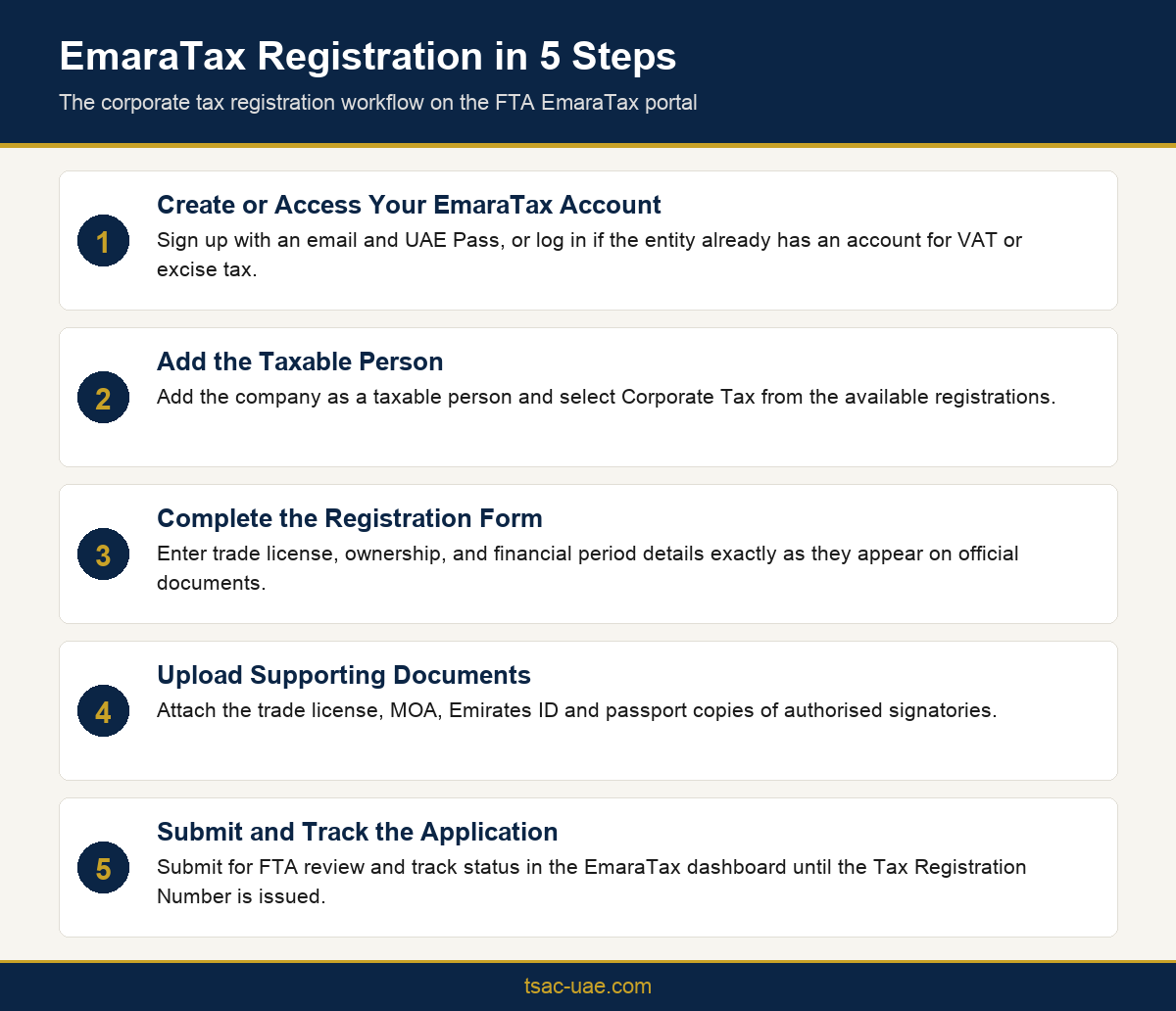
The five stage EmaraTax registration workflow from account setup to Tax Registration Number.
Step Three: Complete the Registration Form Accurately
The registration form requests trade license number and issuing authority, shareholder and management details, and the company’s chosen financial year end. These fields need to match the trade license and MOA exactly, since a name or date mismatch is the single most common reason an EmaraTax corporate tax registration gets sent back (see the FTA registration requirements) for correction rather than approved on first submission.
A useful practice before starting the form is to lay out the trade license, MOA and any free zone establishment certificate side by side and confirm the company name, license number, issue date and shareholder names are identical across all three. Even small differences, such as an abbreviated trading name used on one document and the full legal name used on another, are enough to trigger a request for clarification.
The financial year end field deserves particular care, since changing it after registration involves a separate FTA request rather than a simple edit. Businesses should confirm their intended financial year with their accountant or auditor before this step, rather than entering a default date and revisiting the decision later.
Shareholder details should be entered exactly as recorded in the MOA, including full legal names and shareholding percentages. A group structure with corporate shareholders, rather than individuals, should also confirm in advance which supporting documents EmaraTax expects for a corporate shareholder, since this differs from the documents required for an individual owner.
Step Four: Upload Supporting Documents
Supporting documents typically include the trade license, MOA or equivalent, and Emirates ID and passport copies for authorised signatories. Free zone companies should also have their free zone establishment certificate ready, since this is requested alongside the trade license in most cases.
Document quality matters as much as document choice. Scanned copies should be clear, current and uncropped, since a portal that rejects a blurred or expired attachment adds an extra correction cycle to what should otherwise be a straightforward submission. Keeping a single, organised folder of current corporate documents ready for reuse across registrations, renewals and future TRC applications saves considerable time over a company’s life cycle.
Businesses with more than one authorised signatory should upload documents for each individual named in the application, rather than assuming one signatory’s documents are sufficient for the whole company. Incomplete signatory documentation is another common, easily avoided reason a submission is queried.
Step Five: Submit and Track Your Application
After submission, the application status can be tracked directly in the EmaraTax dashboard. Once approved, the FTA issues a Tax Registration Number, and this date becomes the anchor for future filing deadlines. Businesses that also need a tax residency certificate later should keep a copy of this registration confirmation, since the FTA will expect the corporate tax registration to already be complete and consistent before a TRC application is reviewed.
It is good practice to save a dated copy of the final confirmation and the Tax Registration Number outside the portal as well, in a company’s own records, since this reference is requested repeatedly across future filings, audits and bank account opening processes.
If EmaraTax requests additional information after submission, responding promptly matters more than it might seem. A query left unanswered for an extended period can cause an application to lapse, requiring the business to restart the submission rather than simply supplying the missing detail.
Conclusion
Emaratax corporate tax registration is a process most businesses only need to get right once, but getting it wrong the first time costs real weeks in resubmission cycles. Preparing trade license, ownership and financial year details before logging in, and matching every field exactly to official documents, is the difference between a same week approval and a month of back and forth. The five steps in this guide, account setup, taxable person selection, the registration form, document upload and submission, cover every screen a first time filer will actually encounter. TSAC can manage this registration end to end for businesses that would rather hand off the portal work entirely.
Frequently Asked Questions
How do I register for corporate tax in the UAE?
Registration happens online through the EmaraTax portal, where a business creates or accesses an account, adds itself as a taxable person, and submits trade license and ownership details for corporate tax.
What documents are needed for EmaraTax corporate tax registration?
A valid trade license, Memorandum of Association or equivalent, and Emirates ID and passport copies of authorised signatories are the core documents required for most applicants.
How long does it take to get a corporate tax registration number?
A complete, accurate application usually results in a Tax Registration Number within a few working days, though incomplete submissions can take considerably longer.
Can I register for corporate tax without a VAT registration?
Yes, corporate tax registration is independent of VAT registration, though businesses with an existing EmaraTax account for VAT can use the same login to add corporate tax.
What happens if my EmaraTax registration details do not match my trade license?
Mismatched details are the most common reason an application is returned for correction, which delays issuance of the Tax Registration Number and pushes back the filing timeline.
Do free zone companies register for corporate tax the same way as mainland companies?
The EmaraTax registration steps are the same, but free zone companies also submit their free zone establishment certificate and may face additional free zone specific requirements.
Who can register a company for corporate tax on its behalf?
A director, authorised signatory, or a registered tax agent acting under a valid mandate can complete the EmaraTax registration on behalf of a company.